Wednesday, 18 April 2018

Testing Life Cycle

Test O Fuell - > Find Testing Stuff Easily :p: Testing Life Cycle

Pages

Testing Life Cycle
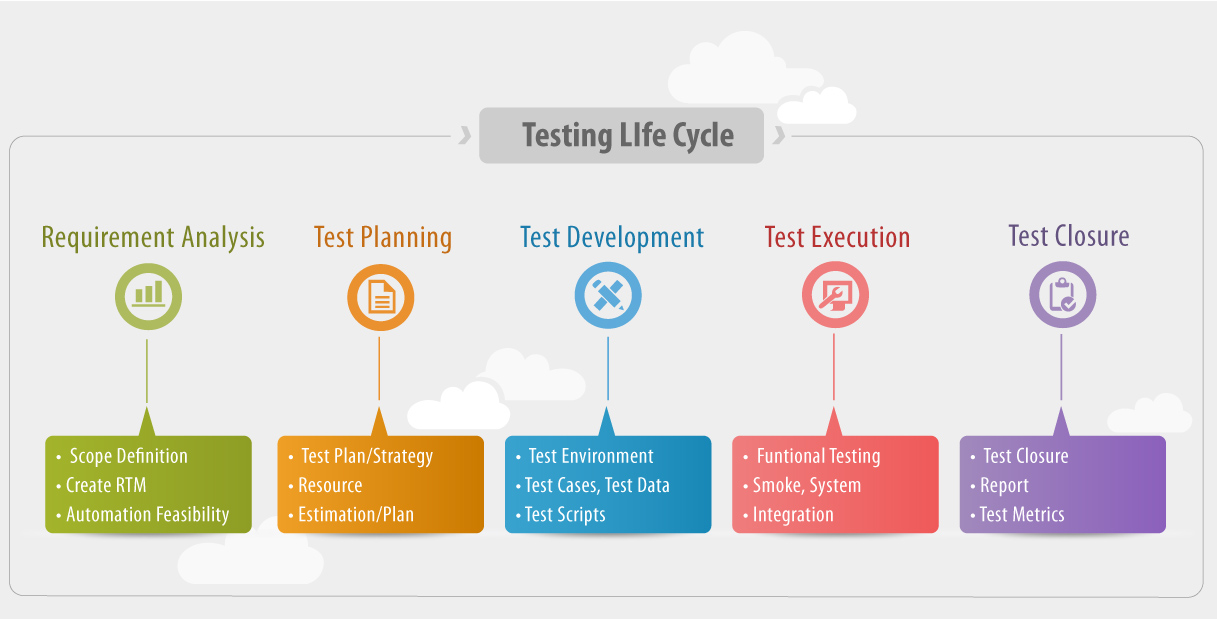

* Click on image to expand

A sample testing cycle

Although variations exist between organizations, there is a typical cycle for testing. The sample below is common among organizations employing the Waterfall development model. The same practices are commonly found in other development models, but might not be as clear or explicit.
  • Requirements analysis: Testing should begin in the requirements phase of the software development life cycle. During the design phase, testers work to determine what aspects of a design are testable and with what parameters those tests work.
  • Test planningTest strategytest plantestbed creation. Since many activities will be carried out during testing, a plan is needed.
  • Test development: Test procedures, test scenariostest cases, test datasets, test scripts to use in testing software.
  • Test execution: Testers execute the software based on the plans and test documents then report any errors found to the development team.
  • Test reporting: Once testing is completed, testers generate metrics and make final reports on their test effort and whether or not the software tested is ready for release.
  • Test result analysis: Or Defect Analysis, is done by the development team usually along with the client, in order to decide what defects should be assigned, fixed, rejected (i.e. found software working properly) or deferred to be dealt with later.
  • Defect Retesting: Once a defect has been dealt with by the development team, it is retested by the testing team. AKA Resolution testing.
  • Regression testing: It is common to have a small test program built of a subset of tests, for each integration of new, modified, or fixed software, in order to ensure that the latest delivery has not ruined anything, and that the software product as a whole is still working correctly.
  • Test Closure: Once the test meets the exit criteria, the activities such as capturing the key outputs, lessons learned, results, logs, documents related to the project are archived and used as a reference for future projects.


    * Taken from Wikipedia.org

OpenERP Test Strategy

Test O Fuell - > Find Testing Stuff Easily :p: OpenERP / Odoo Testing Strategies

Pages

OpenERP / Odoo Testing Strategies

Hey guys , let's understand how to test an Odoo Application Manually


  • Flow of testing that what field will be required necessary here or not
  • Domain strategy that wheather a one field should be tested by perticular level of domains or not
  • Dependent field valudations means if 2 fields are dependent or may be one change event effects another field then wheather they are working properly or not
  • By overviewing lines fields checking that wheather they are perfectly matching with forms/wizards or not
  •  When checking workflow & the older version is available then check that wheather it is running perfectly or not
  •  Checking that wheather required fields are taken perfectly or not
  • Specialise in invoice flow that whather they are running perfectly or not
  •  When onchange is made on another field then try to analyse that wheather that is perfect or not
  •  In reports , try to check that wheather they are printed prfectly as per the requirement or not
  •  When talking about user rights then try to check that if priviliged menu is visible to a user or not
  • In workflow , wheather different kinds of buttons are seen to a priviliged user or not
  • Specialise in a payroll , it means in general scenario they are affected with ( Loans , Expenses , Allowences ) So if u r definding them then u have to take it in mind that payroll salary computation will get affected with that
  •  When checking new version with older version , try to follow the security rules of older version , a security.csv file is attached with every module so try to observe user rights , they are defined by their objects
  • Specially problem will arise in from date & to date field in every module , this is a common mistake made by developers
  • Taking a negative age is a common mistake made by developers so first of all check it
  •  Sometimes some dependency relationships are quite often in nature means unless when u left it blank then it will not allowed u to fill dependent field that causes an integrity error , so at that time developers have to put an appropriate error message that can be easily understood by even a non technical user
  • In allowences , when u have specially defined it in a configuration menu then get check that by not giving it means by default they are taking which values in a field
for ex . in configuration u have taken mobile allowence as 200 Euro for a group A so when definding group A it should be taken 200 Euro


  • Try to avoid commence sense things but also talk once to developer , come on there will not a robot on a pc
  •  Some times some views are not perfect but it will not be considered in a developer's mistake , it can be a framework mistake
  •  When working with user rights , try to understand verification & authorization of each user perfectly & flow according to that user
  •  Take a real time example of a perticular situation that u r handling then try to test with that logic & circumstances
  •  When checking with user roles specially check more information ( notebook tag in form view ) , ( approved by , published by , modified by ) fields
  • When testing in different types of frameworks , first of all u have to consider a structure & limitations of that framework

Explore Videos

Loading...